CATEGORIES
- A free account
- Account assistants
- Account Information
- Affiliate Program
- Appearance
- AppSumo
- Attendee Portal
- Audio & Video
- Branding / Custom / Whitelabel
- Branding Tool
- Break-out Rooms
- Call to Action
- Camera & Microphone
- Capacity & Limits
- Certificates
- Closed captioning
- Decisions - Professional Voting
- E-mail templates
- Event tokens
- Evergreen webinars
- Forms
- How to join meeting on mobiles
- Hubspot Integration
- Integrations
- Language interpretation
- Live Transcription
- Meetings & Webinars
- Other
- Pabbly Connect
- Paid Webinars
- Presence Manager
- Recording
- Registration
- Requirements
- Room Chat
- Screen Sharing
- Session Management
- Statistics & Reports
- Storage
- Streaming
- Sub-Accounts
- Tests & Surveys
- Virtual Backgrounds
- Vote Manager
- Waiting rooms
- Webinar and Meeting Room Features
- Website Presenter
- Whiteboard
- Wordpress plugin
FAQ -> Registration -> Can I manually register participants?
Can I manually register participants?
Manual Registration: Complete FAQ
Manual Registration gives event organizers more control over who can attend their webinars and online events.
When enabled, registrations are not confirmed automatically. Instead, organizers can review each registration and decide whether to approve or deny access.
Quick Answer: What Is Manual Registration?
What is Manual Registration?
Manual Registration allows event organizers to review registrations and manually approve or deny participants before they receive access to an event.
- Manual approval: Organizers decide which registrations to approve.
- Pending status: New registrations remain pending until reviewed.
- Notifications: Organizers can receive email notifications about pending registrations.
- Integrations: Registration data is sent to connected providers after approval.
Table of Contents
- What Is Manual Registration?
- How Do I Enable Manual Registration?
- What Happens After Someone Registers?
- Can I Receive Notifications About Pending Registrations?
- How Can I Manage Pending Registrations?
- What Happens When I Approve a Registration?
- What Happens When I Deny a Registration?
- Can I Use Webhooks With Manual Registration?
- Are There New Email Templates?
- What Does the Manual Registration Flow Look Like?
1. What Is Manual Registration?
Manual Registration is a feature that allows event organizers to manually approve or deny registrations before participants receive access to an event.
When Manual Registration is enabled, new registrations are not confirmed automatically. Instead, they remain pending until the organizer reviews them.
2. How Do I Enable Manual Registration?
When creating or editing an event with registration enabled, the organizer can turn on the Manual Registration option.
Once enabled, each new registration requires approval before the participant receives access to the event.
To enable Manual Registration:
1. Go to the event Registration tab and select the registration form.
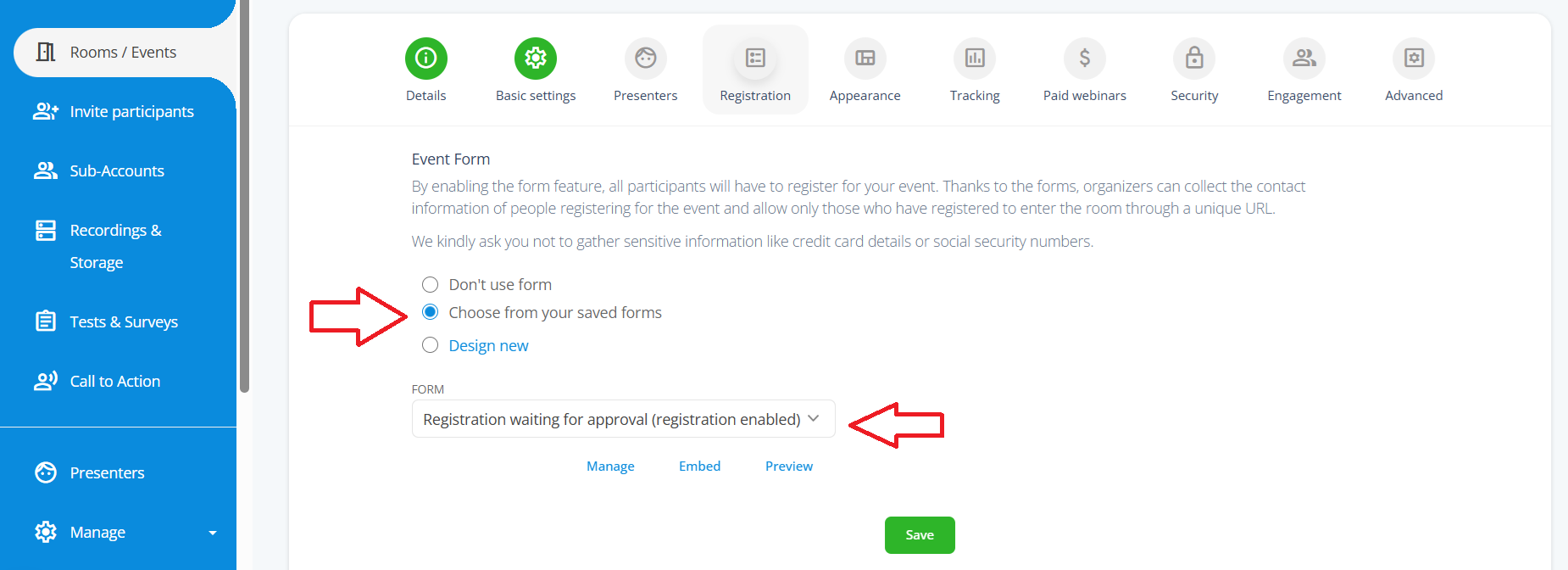
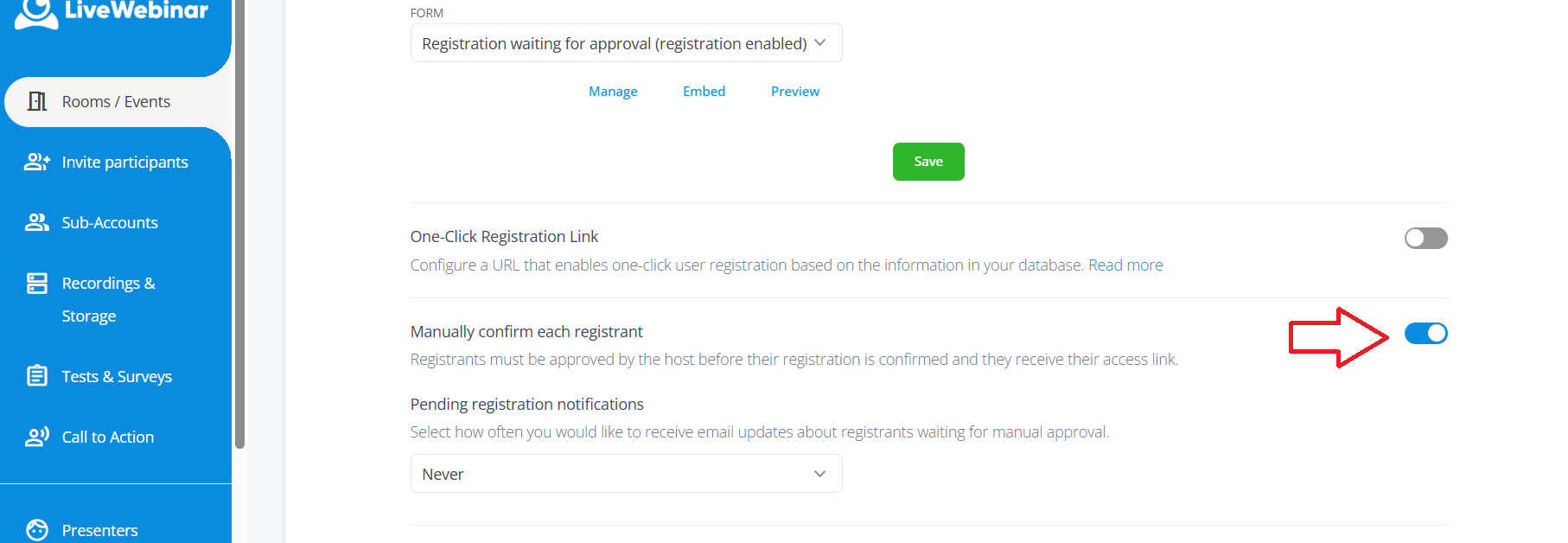
2. Select the “Manually confirm each registrant” option.
Once enabled, new registrations will require your approval before participants receive access to the event.
3. What Happens After Someone Registers?
After submitting the registration form, the registrant receives an email informing them that their registration is pending approval.
Important:
The registrant does not receive an event access link until the organizer approves their registration.
The registrant may receive such an email.
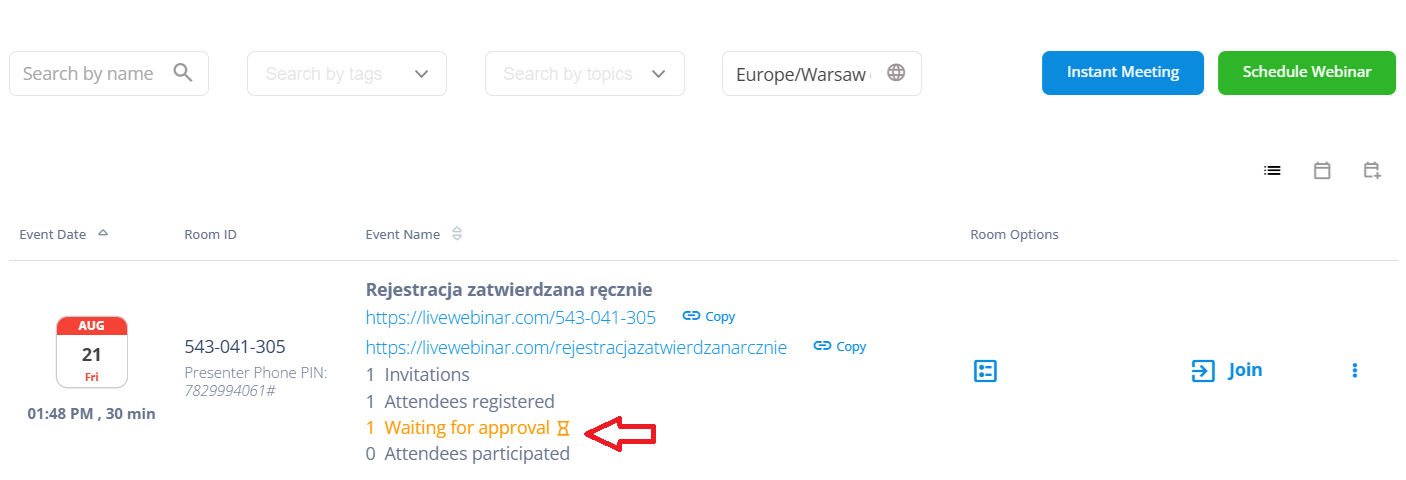
 You can also check the status in the panel:
4. Can I Receive Notifications About Pending Registrations?
Yes. Organizers can choose whether they want to receive email notifications about registrations that are waiting for approval.
The notification frequency can also be configured, allowing organizers to receive updates about pending registrations without necessarily receiving an email for every individual registration.
5. How Can I Manage Pending Registrations?
The Registrants list includes additional filters and actions related to manual approval.
Organizers can identify registrations waiting for approval and choose one of two actions:
- Approve the registration.
- Deny the registration.
6. What Happens When I Approve a Registration?
Once a registration is approved, the participant's registration is confirmed and they can receive the appropriate event access information.
- The registrant will receive a confirmation email with event access details and links.
- Configured webhooks are triggered.
- Registration data can be sent to a connected email marketing provider.
This means that connected integrations are activated only after the registration has been approved.
7. What Happens When I Deny a Registration?
If an organizer denies a registration, the registrant is removed from the registration list.
What happens after denial?
The registrant does not receive event access information, and no data is sent through the standard approval-related integration flow.
8. Can I Use Webhooks With Manual Registration?
Yes. A new registration.pending webhook can be configured for pending registrations.
By default, pending registration data is not sent through the existing integration flow. However, organizers can configure the new webhook if they want to work with pending registrations.
After approval, the standard registration-related webhook flow is triggered.
9. Are There New Email Templates for Manual Registration?
Yes. Two new email templates have been added to Mail Templates to support communication related to the manual registration process.
These templates can be used as part of the communication flow between registration and approval.
Can I change the email template?
Yes, you can. You can choose and set email templates as tou wish. But if you don't do it, dafualt emails will be sent automatically.
10. What Does the Manual Registration Flow Look Like?
Manual Registration flow:
Registration → Pending approval → Organizer review → Approve or Deny
If the Registration Is Approved
- Your registration is confirmed.
- The registrant will receive an email with event access details and links.
- Configured webhooks are triggered.
- Registration data is sent to the connected email marketing provider.
If Registration Is Denied
- The registrant has been removed.
- No event access or standard integration data is sent.
More Control Over Who Joins Your Events
With Manual Registration, organizers can review registrations before granting access to their events. This provides greater control over participants while keeping email notifications and integrations aligned with the approval process.
Try Manual Registration in LiveWebinar
Take more control over event registrations and decide who gets access before the event.
Explore LiveWebinar