CATEGORIES
- A free account
- Account assistants
- Account Information
- Affiliate Program
- Appearance
- AppSumo
- Attendee Portal
- Audio & Video
- Branding / Custom / Whitelabel
- Branding Tool
- Break-out Rooms
- Call to Action
- Camera & Microphone
- Capacity & Limits
- Certificates
- Closed captioning
- Decisions - Professional Voting
- E-mail templates
- Event tokens
- Evergreen webinars
- Forms
- How to join meeting on mobiles
- Hubspot Integration
- Integrations
- Language interpretation
- Live Transcription
- Meetings & Webinars
- Other
- Pabbly Connect
- Paid Webinars
- Presence Manager
- Recording
- Registration
- Requirements
- Room Chat
- Screen Sharing
- Session Management
- Statistics & Reports
- Storage
- Streaming
- Sub-Accounts
- Tests & Surveys
- Virtual Backgrounds
- Vote Manager
- Waiting rooms
- Webinar and Meeting Room Features
- Website Presenter
- Whiteboard
- Wordpress plugin
FAQ -> Meetings & Webinars -> How can I change the date format for my webinar?
How can I change the date format for my webinar?
LiveWebinar allows you to choose from several date formats that will be displayed on your webinar materials. The choice is yours – you can select the standard English-language date format or other formats that better suit your audience.
1. To change the date format for your webinar materials, go to your Profile in Account Details. You’ll find them here.

2. Next, look for the Date Format tab.
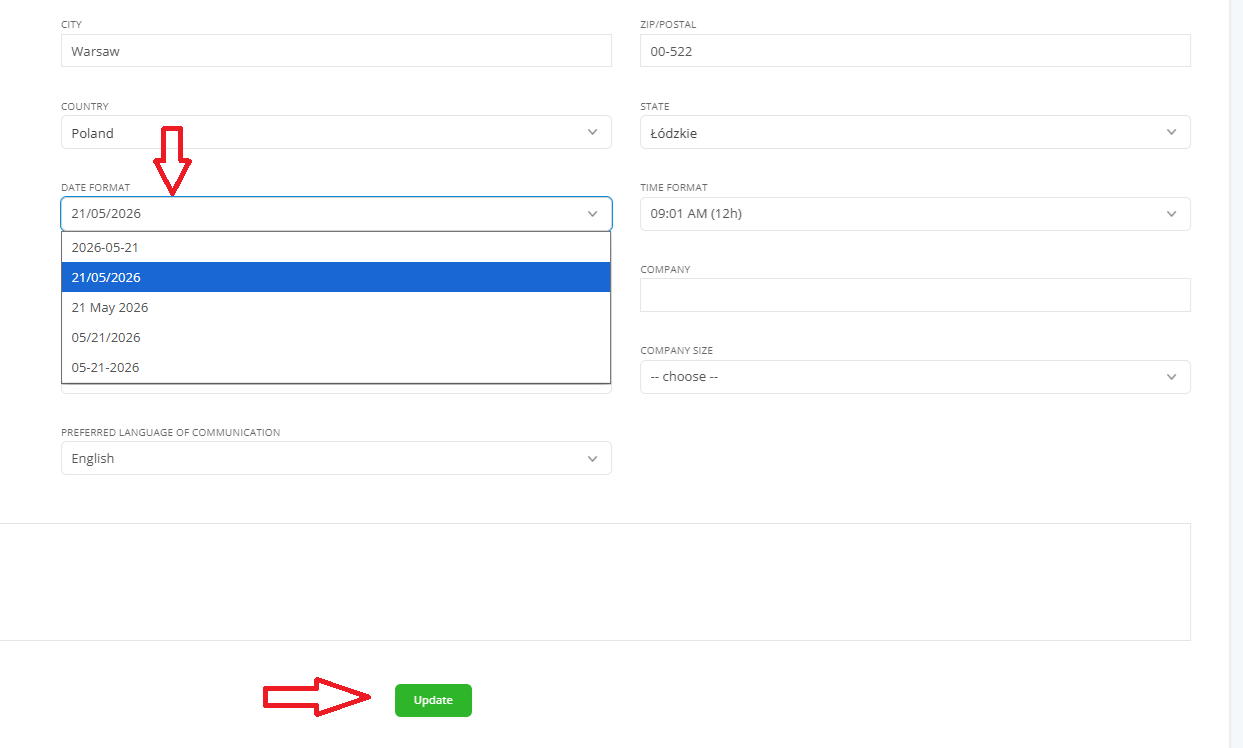
3. Select your preferred date format from the available options.
4. Remember to save your changes by clicking the green Update button at the bottom of the page.
Your new date format will now be applied to all materials related to your webinars: registration forms, reminders, emails and landing pages that you’ll attach to the event in the platform.