CATEGORIES
- A free account
- Account assistants
- Account Information
- Affiliate Program
- Appearance
- AppSumo
- Attendee Portal
- Audio & Video
- Branding / Custom / Whitelabel
- Branding Tool
- Break-out Rooms
- Call to Action
- Camera & Microphone
- Capacity & Limits
- Certificates
- Closed captioning
- Decisions - Professional Voting
- E-mail templates
- Event tokens
- Evergreen webinars
- Forms
- How to join meeting on mobiles
- Hubspot Integration
- Integrations
- Language interpretation
- Live Transcription
- Meetings & Webinars
- Other
- Pabbly Connect
- Paid Webinars
- Presence Manager
- Recording
- Registration
- Requirements
- Room Chat
- Screen Sharing
- Session Management
- Statistics & Reports
- Storage
- Streaming
- Sub-Accounts
- Tests & Surveys
- Virtual Backgrounds
- Vote Manager
- Waiting rooms
- Webinar and Meeting Room Features
- Website Presenter
- Whiteboard
- Wordpress plugin
FAQ -> Forms -> Can I restrict webinar registrations to specific email domains?
Can I restrict webinar registrations to specific email domains?
Yes, you can. To set this up, follow these steps:
- Go to the Form Editor in your LiveWebinar panel.
- Select the “Options” tab.
- Find the setting “Allow to register from specific domains only.”
- Check this option to activate it.
- Enter the domains you want to allow (e.g. mycompany.com, partner.org).
Remember to separate domains using commas or by writing each on a new line.
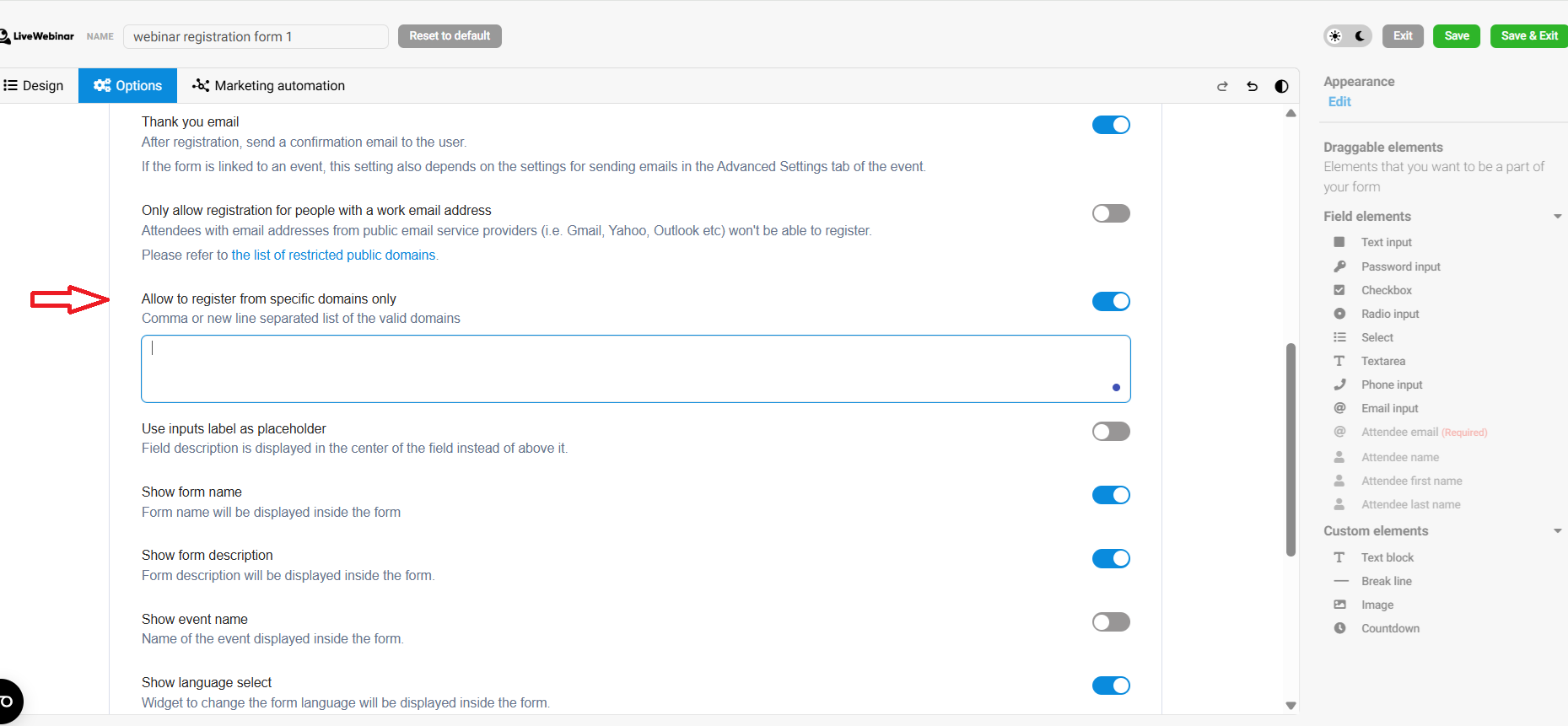
This way, only users with emails from the approved domains will be able to register for your event.