
Afraid people may not listen to you? In this guide, you’ll learn how to structure a webinar script that holds attention from the first minute to the last, using proven storytelling frameworks that keep people watching and ready to take action.

What Is Webinar Storytelling, and Why Does It Work?
Let's start with a simple question: would you rather listen to someone reading a list of facts or someone telling you a story that helps you understand why those facts matter?
Most people would choose the second option.
Webinar storytelling is the art of presenting information through a narrative that connects with your audience. Instead of moving from one slide to another, you guide participants through a sequence of ideas, examples, challenges, and solutions.
It doesn't mean you need to invent characters, create dramatic twists, or turn your business presentation into a movie. Quite the opposite. The best webinar stories are often built around situations your audience experiences every day.
Imagine you're hosting a webinar about email marketing.
You could start by saying:
"Today, we're going to discuss five ways to improve your email marketing strategy."
That's clear, but it doesn't give people much reason to get curious.
Now try this:
"You've spent hours preparing your latest email campaign. You've written the copy, chosen the images, and carefully planned the subject line. You hit send, wait for the results… and nothing much happens. Sound familiar?"
Suddenly, the topic feels more personal. Participants can recognize themselves in the situation. They want to know what went wrong and, more importantly, how to fix it.
That's what a good opening does. It makes people feel that the webinar is about something they genuinely care about.
Why Does Storytelling Make Webinars More Memorable?
Think about how you usually remember information. You might forget a statistic or a bullet point, but a good example or a relatable experience can stay with you for much longer.
Storytelling helps because it:
- Makes your content relatable. People recognize their own challenges in the situations you describe.
- Gives your ideas context. Instead of presenting isolated facts, you show how they connect.
- Makes complex topics easier to understand. Real-life examples help turn abstract concepts into practical lessons.
- Creates curiosity. A question or an unfinished idea gives participants a reason to keep listening.
- Helps your audience remember the message. A clear narrative makes it easier to connect individual takeaways.
The goal isn't to entertain people at the expense of useful information. It's to make useful information easier to understand, remember, and apply.
7 Storytelling Frameworks for Your Webinar
There are several well-known storytelling models that can help structure a webinar, presentation or marketing message:
- The Three-Act Structure – A story unfolds in three stages: setup (introducing the situation and conflict), confrontation (developing the challenge) and resolution (showing how it is solved).
- The Hero’s Journey (Joseph Campbell) – The protagonist faces a challenge, leaves their comfort zone, encounters obstacles, learns something and returns transformed. In marketing, the audience is the hero and the brand acts as a guide.
- Freytag’s Pyramid – A five-part structure: exposition, rising action, climax, falling action and resolution. It builds tension towards a turning point.
- The Story Spine (Kenn Adams) – A simple narrative formula: “Once upon a time… Every day… Until one day… Because of that… Until finally… And ever since then…”. Useful for creating clear, engaging stories.
- The Problem–Agitate–Solution (PAS) Framework – Introduce a problem, highlight why it matters and present a solution. Commonly used in marketing and persuasive communication.
- The Before–After–Bridge (BAB) Framework – Show the audience their current situation, describe a better future and explain how to get there.
- The Pixar Storytelling Formula – A character and their familiar world are introduced, something changes, challenges follow and the story leads to a meaningful outcome.
Here are practical, real-life examples of each storytelling framework, using situations from business, marketing and webinars.
1. The Three-Act Structure
Theory: Setup → Confrontation → Resolution.
Real-life example: A webinar about time management
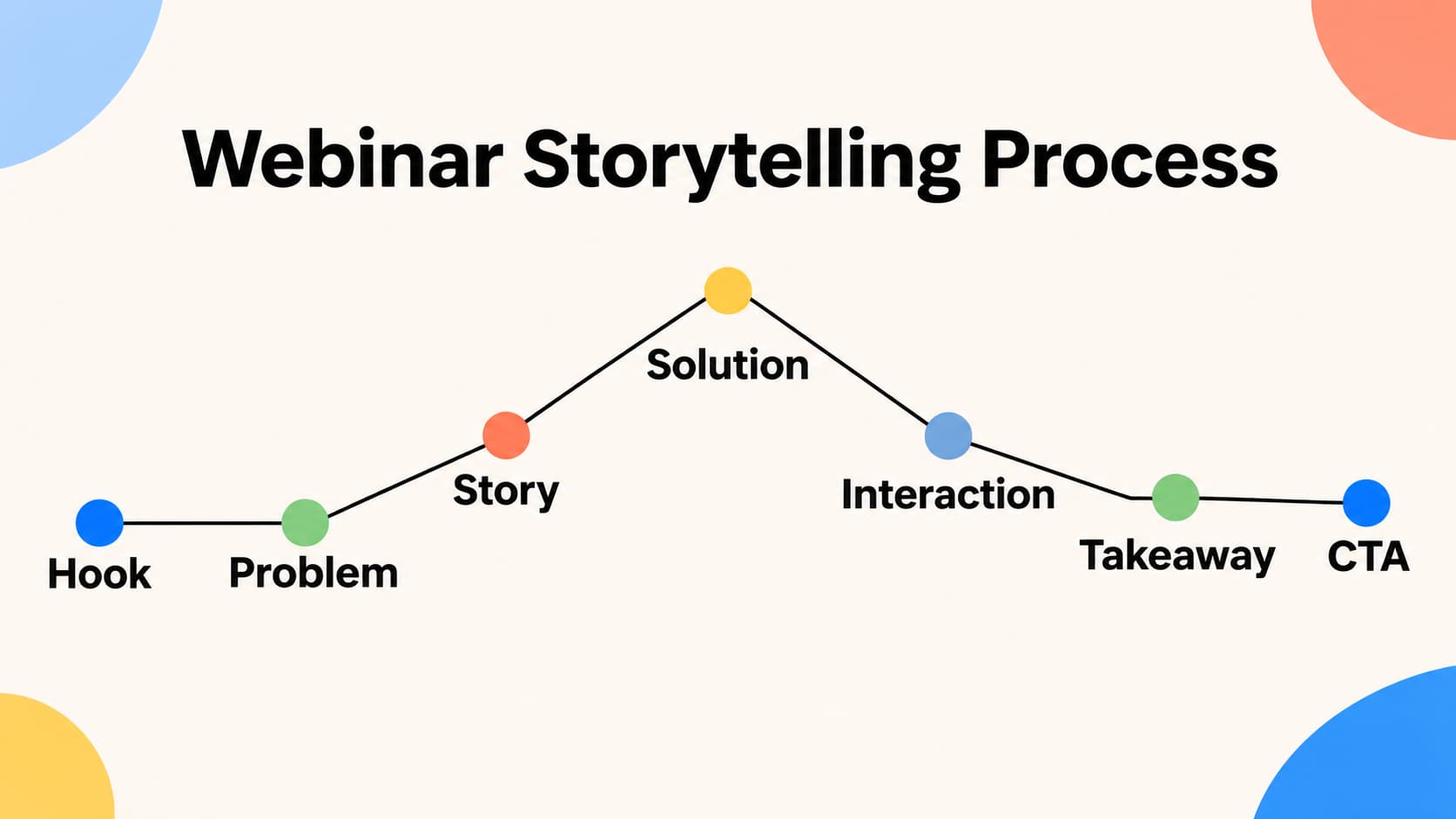
- Act 1 – Setup: "When I started my business, I thought working longer hours would help me grow faster."
- Act 2 – Confrontation: "But soon, I was working evenings and weekends, constantly behind on tasks and struggling to find time for clients."
- Act 3 – Resolution: "I changed the way I planned my week, prioritised important tasks and started setting boundaries. I get more done without working longer hours."
2. The Hero’s Journey
Theory: The hero faces a challenge, encounters obstacles, discovers a solution and transforms.
Real-life example: A customer success story
A small business owner wants to attract more clients but struggles to stand out online. They tried social media posts, paid ads and networking, but nothing brought consistent results. Then they discovered the power of educational webinars. After learning how to create valuable sessions and build relationships with attendees, they start generating qualified leads and attracting new clients.
In a webinar: The audience is the hero. You are the guide who helps them overcome their challenges.
3. Freitag’s Pyramid
Theory: Exposition → Rising Action → Climax → Falling Action → Resolution.
Real-life example: A product launch
- Exposition: A company notices that customers struggle to manage several marketing tools.
- Rising Action: The team starts developing a solution, but faces technical challenges and delays.
- Climax: Just before launch, they discover a critical problem that could affect the entire product.
- Falling Action: The team fixes the issue and tests the product again.
- Resolution: The product launches successfully and helps customers simplify their work.
In a webinar: This structure works well when presenting a case study or explaining how a problem was solved.
4. The Story Spine
Theory: A simple sequence of events connected by cause and effect.
Real-life example: A personal branding webinar
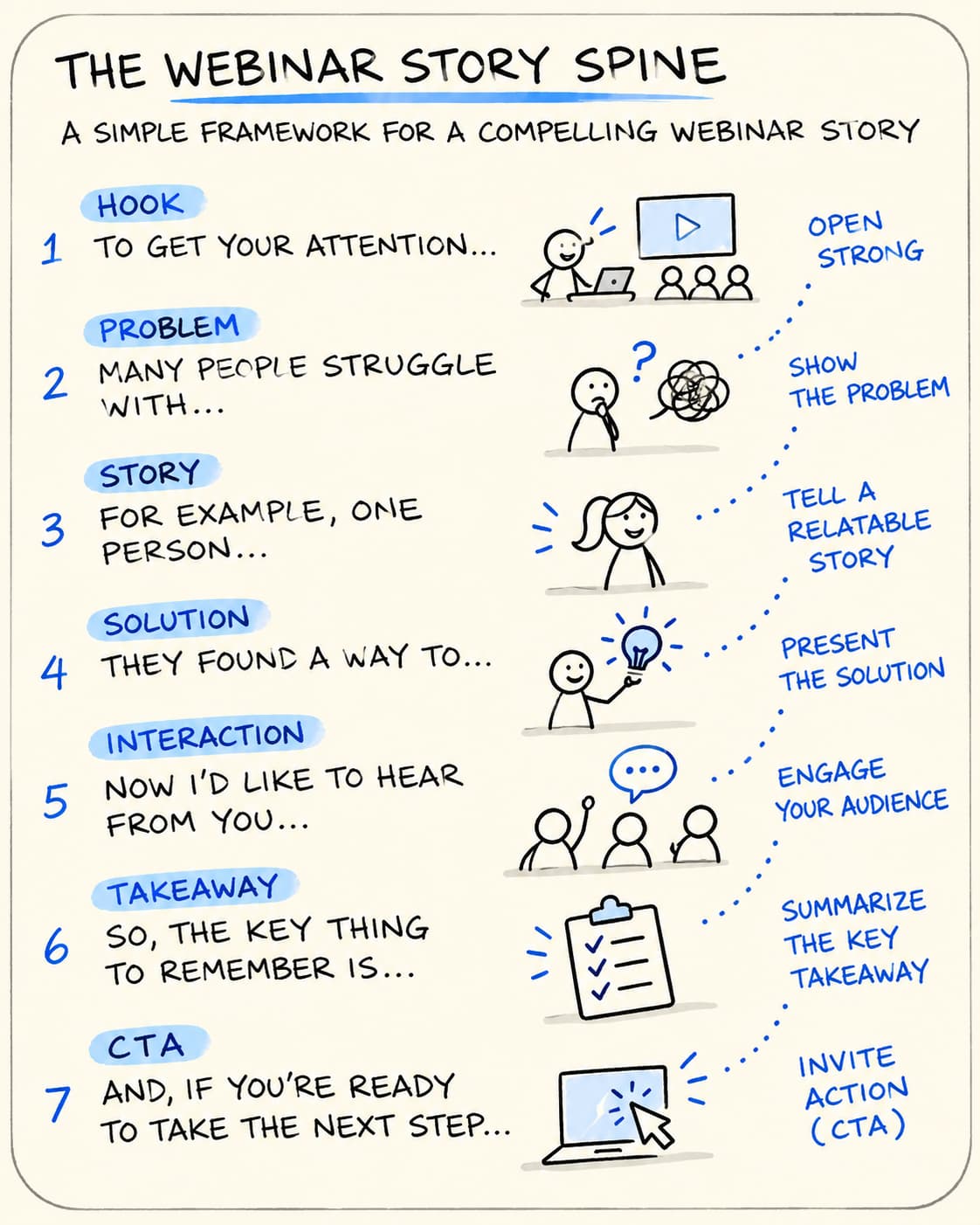
- Once upon a time: An expert had years of professional experience.
- Every day: They worked with clients but rarely communicated their knowledge online.
- Until one day: They realised potential clients didn't understand what made their services different.
- Because of that: They started sharing practical advice and hosting educational webinars.
- Until finally: They built a recognisable personal brand and attracted new opportunities.
- And ever since then: They have used content and webinars to build relationships with their audience.
In a webinar: Use this framework to tell short personal stories, introduce case studies or explain a client's journey.
5. Problem–Agitate–Solution (PAS)
Theory: Present a problem, make its consequences tangible and introduce a solution.
Real-life example: Promoting a webinar about email marketing
- Problem: "You have a mailing list, but hardly anyone opens your emails."
- Agitate: "You spend hours creating campaigns, but your messages get lost in crowded inboxes. Potential customers never discover your offers."
- Solution: "In this webinar, you'll learn how to write more relevant subject lines, segment your audience and create emails people want to read."
In a webinar: PAS is particularly useful for the opening section, especially when you want participants to recognise why the topic matters.
6. Before–After–Bridge (BAB)
Theory: Show the current situation, describe the desired future and explain how to get there.
Real-life example: Promoting a productivity course
- Before: "You start every morning with a long to-do list and finish the day feeling that nothing important has been completed."
- After: "Imagine starting your day with clear priorities, knowing exactly what deserves your attention."
- Bridge: "Our productivity course shows you how to plan your week, manage distractions and build a routine that works."
In a webinar: BAB is effective when presenting the benefits of a method, service or product.
7. The Pixar Storytelling Formula
Theory: Introduce a character and their everyday world, show what changes, develop the challenges and reveal the outcome.
Real-life example: A webinar about launching an online business
- Once upon a time: Anna had a great idea for an online business but didn't know where to start.
- Every day: She researched competitors, planned her offer and postponed launching because she was afraid of making mistakes.
- One day: She decided to organise her first free webinar.
- Because of that: She started talking directly to potential customers and learned what they really needed.
- Because of that: She improved her offer and built her first customer relationships.
- Until finally: She launched her business with a clearer offer and a better understanding of her audience.
In a webinar: This formula helps turn an abstract business lesson into a relatable human story.
Quick Guide: Which Framework Should You Choose?
| Your goal | Best framework |
|---|---|
| Structure an entire webinar | Three-Act Structure |
| Build an emotional connection | Hero’s Journey |
| Present a case study with tension | Freytag’s Pyramid |
| Tell a short personal story | Story Spine |
| Highlight a problem and introduce a solution | PAS |
| Show the benefits of a transformation | Before–After–Bridge |
| Create relatable customer success stories | Pixar Formula |
The key takeaway: You don't need to use all seven frameworks in one webinar. Choose one structure for your overall presentation and use others for individual stories, examples or transitions. This will make your webinar feel more natural rather than like a sequence of disconnected slides.
Before You Write Your Webinar Script, Find the Story
Here's a mistake many webinar hosts make: they open a presentation, start adding slides, and only then think about what they want to say.
It's tempting because creating slides feels like progress. But before you open PowerPoint or start writing your script, take a step back.
Ask yourself: What story am I trying to tell?
You don't need a complicated plot. You just need to understand where your audience is starting, where you want to take them, and what they should gain along the way.
A simple way to find that story is to answer four questions.
1. What Is Your Audience Struggling With?
Start with their world, not yours.
What keeps them busy? What are they trying to improve? What have they already tried? What isn't working?
For example, if you're hosting a webinar for small business owners, their challenge might be:
"I know I should be creating content regularly, but I don't have enough time to come up with new ideas every week."
That's much more useful than simply identifying your topic as "content marketing."
The more clearly you understand your audience's problem, the easier it becomes to create a webinar that feels relevant.
2. What Do You Want Them to Discover?
Every good webinar should have one central idea.
You may want participants to understand that they don't need to create completely new content every week. They can take one useful piece of content and adapt it for different channels.
That's your main message.
Write it down in one sentence. If you can't explain what your webinar is really about in a simple way, your audience may struggle to follow it too.
3. What Changes by the End of the Webinar?
Think about the difference between someone joining your webinar and leaving it.
At the beginning, they might feel confused, frustrated, or unsure where to start. By the end, they should have a clearer understanding of the problem and know what to do next. This is the journey your presentation should create.
4. What Will Make Them Believe You?
People don't connect with information alone. They want to understand how it works in real life.
That's why examples, demonstrations, customer experiences, and personal observations are so valuable.
Instead of simply saying that a particular strategy works, show what it looks like in practice.
A useful story doesn't have to be dramatic. Sometimes a simple before-and-after example is enough.
How to Keep Your Audience Engaged from Beginning to End
When people attend an in-person event, there are plenty of natural ways to stay connected: eye contact, conversations, body language, and the atmosphere in the room. During a webinar, many of these signals disappear. That's why it's worth planning interaction before the event starts.
Use Polls to Make Participants Part of the Story
Let's say you're hosting a webinar about marketing automation.
You can start by asking:
"How much of your marketing process is automated right now?"
- Almost nothing.
- A few basic tasks.
- Most recurring activities.
- Nearly everything.
Now you know something about the people in the room. You can refer to their answers and adapt your examples accordingly.
Polls are especially useful when you want to introduce a topic, check understanding, or compare different perspectives.
Use Chat to Make the Webinar Feel More Personal
Sometimes all it takes is one question to get people involved.
Invite participants to share their experiences, challenges, or ideas in the chat.
For example:
"What's one thing you wish you had known before hosting your first webinar?"
If appropriate, respond with a few answers during the presentation. People are more likely to participate when they feel their contributions are being noticed.
Leave Room for Questions
Don't treat Q&A as something you squeeze into the last 30 seconds. Questions can reveal what participants really want to know. They can also help you explain an idea from a different perspective. For longer webinars, consider including short Q&A moments between sections.
Change Things Up
Even the most interesting speaker can become difficult to follow if the format never changes. Try combining:
- Your presentation.
- Short demonstrations.
- Screen sharing.
- Videos.
- Polls.
- Chat discussions.
- Questions and answers.
Think about the rhythm of the event. A change of format at the right moment can help participants refocus.
How to Write a Webinar Script: A Simple Process You Can Follow
If you're preparing your next webinar, here's a practical workflow to help you get started.
- Step 1: Decide what you want the audience to gain.
Choose one main objective. What should participants understand, learn, or do after the event? - Step 2: Get to know your audience.
Write down their biggest challenges, what they already know, and what they hope to achieve. - Step 3: Find your central message.
Summarize the main idea of your webinar in one sentence. - Step 4: Write your opening.
Prepare a question, short story, or relatable situation that makes people want to listen. - Step 5: Organize your main points.
Divide the presentation into three to five sections. Give each section a clear purpose. - Step 6: Add stories and examples.
Think about where a real-life situation, customer experience, or demonstration could help explain your ideas. - Step 7: Plan moments of interaction.
Decide when to use polls, chat questions, and Q&A. - Step 8: Connect the sections.
Write short transitions so the presentation flows naturally. - Step 9: Prepare your conclusion and CTA.
Bring the story together and give participants a relevant next step. - Step 10: Rehearse.
Read the script aloud. Check the timing, test your presentation, and make sure the words sound like something you would actually say.
One final thought: don't try to memorize every sentence. A good script should give you confidence, not make you sound robotic.
Common Webinar Storytelling Mistakes to Avoid
Sometimes it's not what you include in a webinar that causes problems. It's what you do too much of.
Here are a few common mistakes to watch out for.
Trying to Say Everything
You know your subject inside out, so it's tempting to share every useful detail.
But when you introduce too many ideas, the audience can lose sight of the main message.
Try this instead: Choose the most important points and save the rest for another webinar, an article, or a follow-up resource.
Spending Too Much Time Introducing Yourself
Your experience matters, but participants join because they want help with a particular topic.
Try this instead: Keep your introduction short and connect your expertise to the problem you're going to solve.
Adding Stories Just Because They Sound Interesting
A funny anecdote or personal experience can make a presentation more enjoyable, but it should still have a purpose.
Try this instead: Ask whether the story helps explain an idea, illustrate a problem, or support your main message.
Reading Every Word from Your Script
A perfectly written script can still make for a dull presentation if you read it without looking up or engaging with participants.
Try this instead: Prepare talking points and key phrases. Rehearse enough to feel confident, then speak naturally.
Forgetting to Involve the Audience
It's easy to get carried away when you're explaining something you know well.
But remember: your participants are there too.
Try this instead: Add interaction throughout the webinar, not just at the beginning or end.
Ending Without a Clear Next Step
You've shared your knowledge, answered questions, and reached the final slide. Now what?
Try this instead: Give participants one clear action they can take after the webinar. Make it relevant to what they've just learned.
How LiveWebinar Can Help Bring Your Webinar Story to Life
You've planned your narrative, written your script, and prepared your examples. Now it's time to think about how people will experience your webinar.
The right platform can make it easier to turn a presentation into an interactive event.
With LiveWebinar, you can use a range of tools to support your content and involve participants throughout the session.
Make Your Presentation Interactive
You can use LiveWebinar's interactive features, such as polls, surveys, chat, and Q&A, to create moments like this. These features help you collect opinions, encourage discussion, and make participants feel involved rather than simply watching from the other side of the screen.
Give Your Webinar a Consistent Brand Experience
Your webinar is also an opportunity to build recognition and trust. A consistent visual identity can help participants connect the event with your business.
LiveWebinar offers customization and branding options that allow you to adapt the webinar environment to your brand. You can use your visual identity across the experience and create a more professional setting for your audience.
Keep Your Content Working After the Live Event
Here's something worth remembering: the work you put into a great webinar doesn't have to end when the event is over.
With our recording and automated webinar options, you can make selected content available beyond the original live session.
This gives people who can't attend an opportunity to access your material and allows you to reuse valuable content in your wider marketing strategy.
You can also turn one webinar into several smaller pieces of content:
- A short video featuring one important insight.
- A LinkedIn post based on a useful example.
- A blog article expanding on the main topic.
- An email sharing the key takeaways.
- A recording that participants can revisit.
Final Thoughts: People May Forget Your Slides, but They'll Remember Your Story
Think back to the beginning of this article.
You joined a webinar that sounded interesting, but after a few minutes, your attention started to drift.
Now imagine a different experience.
The presenter opens with a situation you recognize. They tell you something that makes you curious. They explain the topic through practical examples, invite you to share your thoughts, and guide you towards a solution.
You don't feel like you're sitting through a presentation. You feel like you're part of a conversation.
That's what good webinar storytelling can do.
It doesn't require a complicated script, a dramatic personality, or a perfect presentation. It starts with understanding your audience and finding a meaningful way to share what you know.
So, before you create your next set of slides, ask yourself one simple question:
What story do I want my audience to remember after the webinar ends?
Start there. Build your presentation around that idea, and use interaction to bring people along for the journey.
And when you're ready to turn that story into an engaging online experience, explore LiveWebinar and discover the tools that can help you bring your next webinar to life.
Frequently Asked Questions About Webinar Storytelling
What Is Webinar Storytelling?
Webinar storytelling is a way of presenting information through a clear, engaging narrative. Instead of simply sharing facts and slides, the presenter connects ideas through relatable problems, examples, and solutions, helping participants follow and remember the message.
How Do You Make a Webinar More Engaging?
Start with a topic your audience cares about, use a clear narrative, and include practical examples. Keep participants involved through polls, chat questions, Q&A sessions, and demonstrations. Most importantly, make sure every section gives them a reason to keep listening.
How Do You Start a Webinar Without Boring Your Audience?
Avoid long introductions and begin with something relevant to the audience. A thought-provoking question, a short personal story, a familiar challenge, or an unexpected insight can help capture attention. Then explain what participants will gain from the session.
How Do You Write a Good Webinar Script?
Start with your audience's main problem and define one central message. Write an engaging opening, organize the main presentation into three to five sections, add stories and examples, plan interaction, and finish with a clear takeaway and CTA. Rehearse the script so it sounds natural rather than memorized.
How Long Should a Webinar Introduction Be?
For many educational and business webinars, an introduction of around 2–5 minutes is a useful starting point. It should capture attention, briefly introduce the presenter, explain the value of the session, and set expectations.
What Storytelling Techniques Work Best in Webinars?
Useful techniques include opening with a relatable story, using the problem–solution–result structure, creating curiosity, sharing real-life examples, asking questions, using visual storytelling, and connecting each section through natural transitions.
How Can You Keep People from Leaving a Webinar Early?
Give participants a clear reason to stay. Set expectations at the beginning, deliver useful information throughout the session, vary the presentation format, and include opportunities to interact. Avoid long introductions and unnecessary repetition.
Should You Write a Webinar Script Word for Word?
Not necessarily. A detailed outline with key talking points, examples, transitions, and audience interaction is often enough. A full script can be helpful for important openings or complex explanations, but your delivery should still sound natural.
How Do You End a Webinar Effectively?
Bring the presentation back to its main message, summarize the most useful lessons, and give participants one clear next step. A relevant CTA might encourage them to download a resource, try a strategy, attend another webinar, or explore a product.