LiveWebinar Android App: Complete FAQ
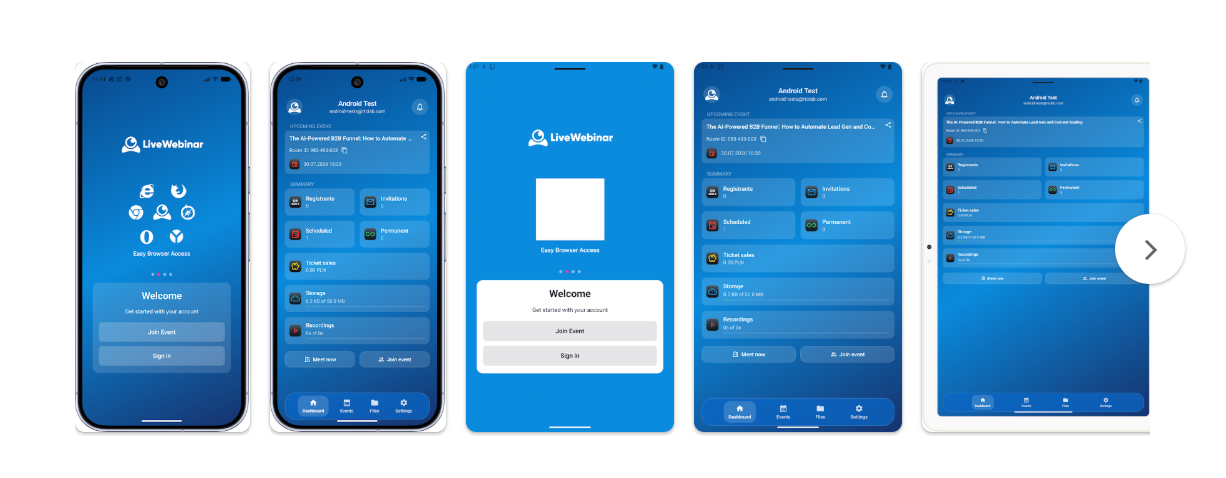
LiveWebinar is now available on Android. With the new mobile app, you can access your LiveWebinar experience directly from your smartphone and stay connected to your webinars wherever you are.
Whether you're working remotely, traveling, or simply away from your desk, the LiveWebinar Android app makes it easier to stay connected to your online events without relying on a computer.
Quick Answer: What Is the LiveWebinar Android App?
What is the LiveWebinar Android app?
The LiveWebinar Android app is a mobile application that lets LiveWebinar users access and participate in their online events from an Android device.
- Available on: Android smartphones and compatible devices.
- Purpose: Stay connected to LiveWebinar events while away from your computer.
- Ideal for: Webinars, online meetings, training sessions, and other virtual events.
- Download: Available through Google Play.
Get the LiveWebinar Android App
Download the official LiveWebinar app from Google Play and access your webinars directly from your Android device.
Download on Google PlayTable of Contents
- What Is the LiveWebinar Android App?
- Why Use LiveWebinar on Mobile?
- Who Is the Android App For?
- What Can You Do With the LiveWebinar Android App?
- How Can Professionals Use the App?
- How to Download the LiveWebinar Android App
- Do I Need a LiveWebinar Account?
- Can I Use LiveWebinar on Android and Desktop?
- Frequently Asked Questions
- Final Thoughts
1. What Is the LiveWebinar Android App?
The LiveWebinar Android app brings the LiveWebinar experience to compatible Android devices. It gives users a convenient way to access their online events without having to stay in front of a desktop computer.
The app is designed for people who want more flexibility when attending or managing their online events. Instead of being tied to a desk, you can use your Android device to stay connected while working remotely, traveling, or moving between locations.
Why Does a Mobile Webinar App Matter?
Work doesn't always happen from behind a desk. Teams work remotely, presenters travel, and attendees join online events from different locations and devices. A mobile app makes it easier to stay connected when a computer isn't available.
2. Why Use LiveWebinar on Mobile?
The main advantage of mobile access is flexibility. You don't have to wait until you're back at your desk to join an event or stay connected with your webinar activity.
- Work from anywhere: Access LiveWebinar while working remotely or traveling.
- Stay connected: Keep up with your online events even when you're away from your computer.
- More flexibility: Use a mobile device when a desktop setup isn't convenient.
- Quick access: Open LiveWebinar directly from your Android device.
3. Who Is the LiveWebinar Android App For?
The mobile app can be useful for anyone who uses LiveWebinar and wants to access online events from an Android device.
- Webinar attendees who want to join events from their phones.
- Trainers and educators who need greater flexibility when running online sessions.
- Sales teams who participate in product presentations and online events.
- Marketing teams who organize webinars and virtual events.
- Remote teams that need to stay connected while working from different locations.
- Business professionals who frequently work away from their desks.
4. What Can You Do With the LiveWebinar Android App?
The Android app is designed to make accessing LiveWebinar more convenient from a mobile device. Depending on your account and event setup, you can use the app to stay connected to your online events while away from your computer.
Join Online Events
Join webinars, meetings, training sessions, and other LiveWebinar events directly from your Android device.
Stay Connected While Traveling
Being away from the office doesn't have to mean being disconnected from your online events. Mobile access gives you more flexibility when you're on the move.
Access LiveWebinar From Your Phone
Instead of opening a browser on a computer, you can access LiveWebinar through the dedicated Android application.
5. How Can Professionals Use the LiveWebinar Android App?
For Trainers and Educators
Mobile access can give trainers and educators more flexibility when participating in online classes, training sessions, workshops, and other educational events.
For Marketing Teams
Marketing teams can stay connected to webinars and virtual events even when they are working remotely or traveling.
For Sales Teams
Sales professionals can use mobile access when joining online presentations, product demonstrations, customer sessions, and other virtual events.
For Remote Teams
Remote and distributed teams can stay connected to online meetings and training sessions without depending exclusively on desktop devices.
6. How to Download the LiveWebinar Android App
Where can I download the LiveWebinar Android app?
The LiveWebinar Android app is available through Google Play.
- Open Google Play on your Android device.
- Search for LiveWebinar.
- Open the official LiveWebinar application.
- Tap Install.
- Open the application and access LiveWebinar from your mobile device.
You can also download the app directly using the link below:
7. Do I Need a LiveWebinar Account?
Your access to LiveWebinar features depends on your role and the event you are joining. If you already use LiveWebinar, the mobile app gives you another convenient way to access the platform from your Android device.
8. Can I Use LiveWebinar on Android and Desktop?
Yes. The mobile application complements the LiveWebinar experience on desktop. You can choose the device that best fits your situation instead of being tied to a single location.
For example, you might use your desktop for preparing and managing an event and your mobile device when you need to stay connected while away from your desk.
Frequently Asked Questions About the LiveWebinar Android App
Is LiveWebinar available on Android?
Yes. LiveWebinar now has a dedicated Android mobile application available through Google Play.
Where can I download the LiveWebinar Android app?
You can download the official LiveWebinar Android app from Google Play.
Can I join LiveWebinar webinars from my Android phone?
The Android app provides mobile access to LiveWebinar, allowing users to stay connected to online events from their Android devices.
Can I use LiveWebinar while traveling?
Yes. One of the main benefits of mobile access is greater flexibility when you are working remotely, traveling, or away from your desk.
Is the LiveWebinar Android app free to download?
The app is available to download from Google Play. Access to LiveWebinar features depends on your account and plan.
Does LiveWebinar have an iOS app too?
LiveWebinar also offers a mobile experience for iOS users, giving professionals another way to access their online events from mobile devices.
Take LiveWebinar With You
Your webinars don't have to be tied to your desk. With the new LiveWebinar Android app, you can stay connected to your online events wherever work takes you.
Whether you're working remotely, traveling, or simply away from your computer, mobile access gives you another convenient way to stay connected.
Ready to Take LiveWebinar Mobile?
Download the LiveWebinar Android app and stay connected to your webinars and online events wherever you are.
Download on Google Play